Email Support
Can't find what you're looking for? Drop us a line — we respond fast.
✉️ support@minutekeep.caYou can also reply directly to any email we've sent you.
Common Questions
How do I generate my minute book?
Once you've set up your company (directors, officers, shareholders), go to your company's detail page and click Generate Minute Book.
Your documents (PDF + Word) will be generated and emailed to you within a few minutes. You can also re-download them anytime from your dashboard.
Note: Free accounts can use the current Interactive Minute Book — each generated page shows a heading plus a short preview with the remainder blurred, and uploaded PDFs stay available. Manage and edit forms stay usable. Reading the full page text, and generating or downloading the compiled PDF + Word minute book, require Professional ($99 CAD/yr per corporation).
What does the MinuteKeep ChatGPT readiness check do?
The public readiness check offers a general-information checklist of broad Canadian corporate-record categories that may be worth locating before annual work or a request from an accountant, lawyer, bank, or buyer. It is read-only: it does not create, change, file, sign, upload, or review documents.
It also does not create MinuteKeep accounts, start trials, display prices or plans, change subscriptions, or link to checkout.
Do not share a corporation name or number, business number, address, document, document link, account credential, payment information, or director, officer, or shareholder details. The public check currently supports federal CBCA and Ontario contexts. It is not legal advice, a legal opinion, or a compliance determination; ask a qualified Canadian professional about a specific corporation or transaction.
Learn more at MinuteKeep for ChatGPT.
How do I catch up on annual records for past years?
Every year a corporation should record its annual business in the minute book, either with written resolutions or with minutes of an annual meeting. If some past years were missed, MinuteKeep walks you through them one year at a time, oldest first, and prepares the matching record for each year in PDF and editable Word.
Who can use it: an active Pro business corporation incorporated federally (CBCA) or in Ontario, British Columbia, Alberta or Quebec. Not-for-profit corporations aren't supported yet.
1. Start the catch-up
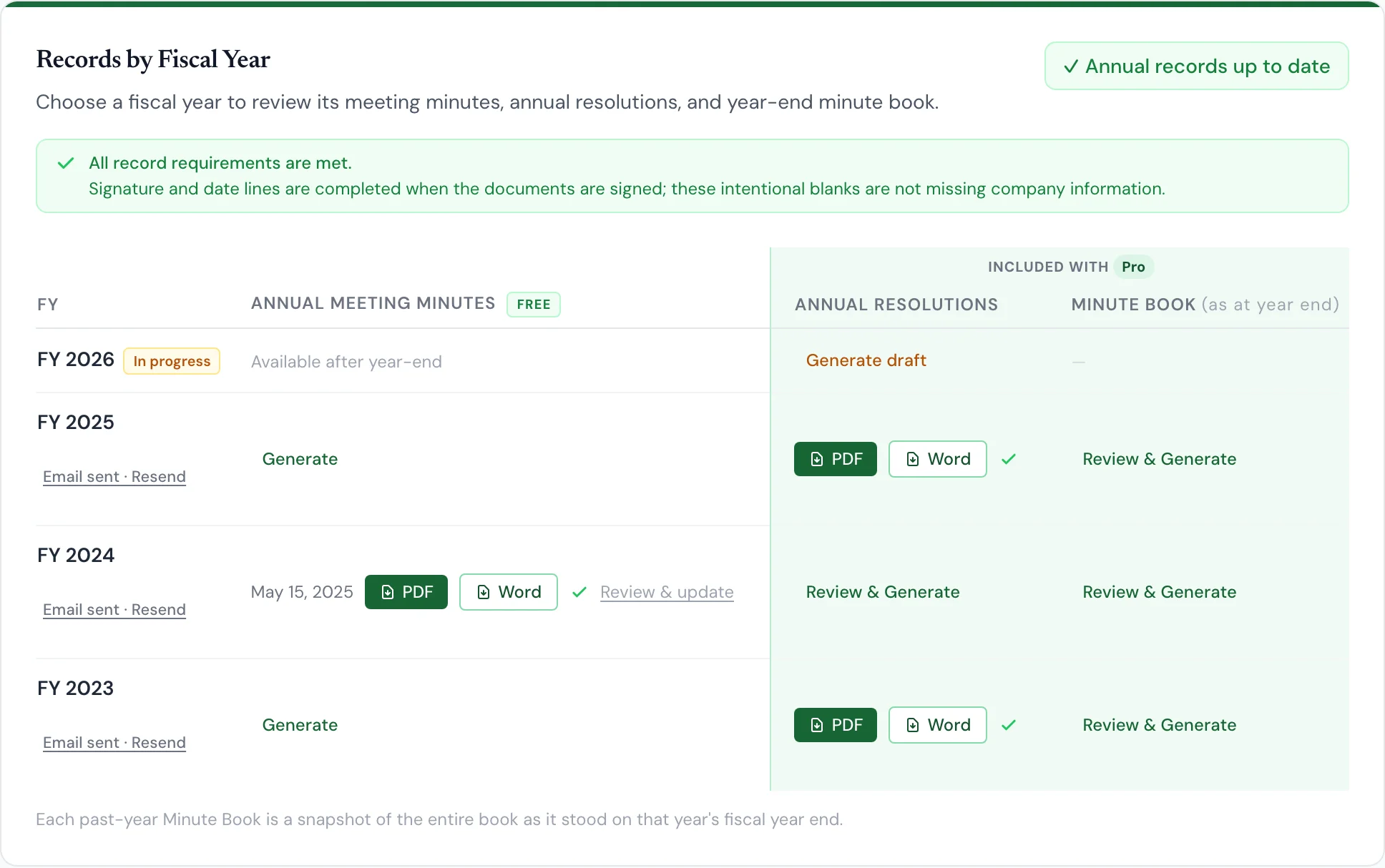
Open your corporation, go to Generate, and choose the Annual Records tab. Records by Fiscal Year lists every fiscal year since incorporation. Completed years without an annual record are counted on the Start catch-up button. Click it to begin with the oldest missing year.
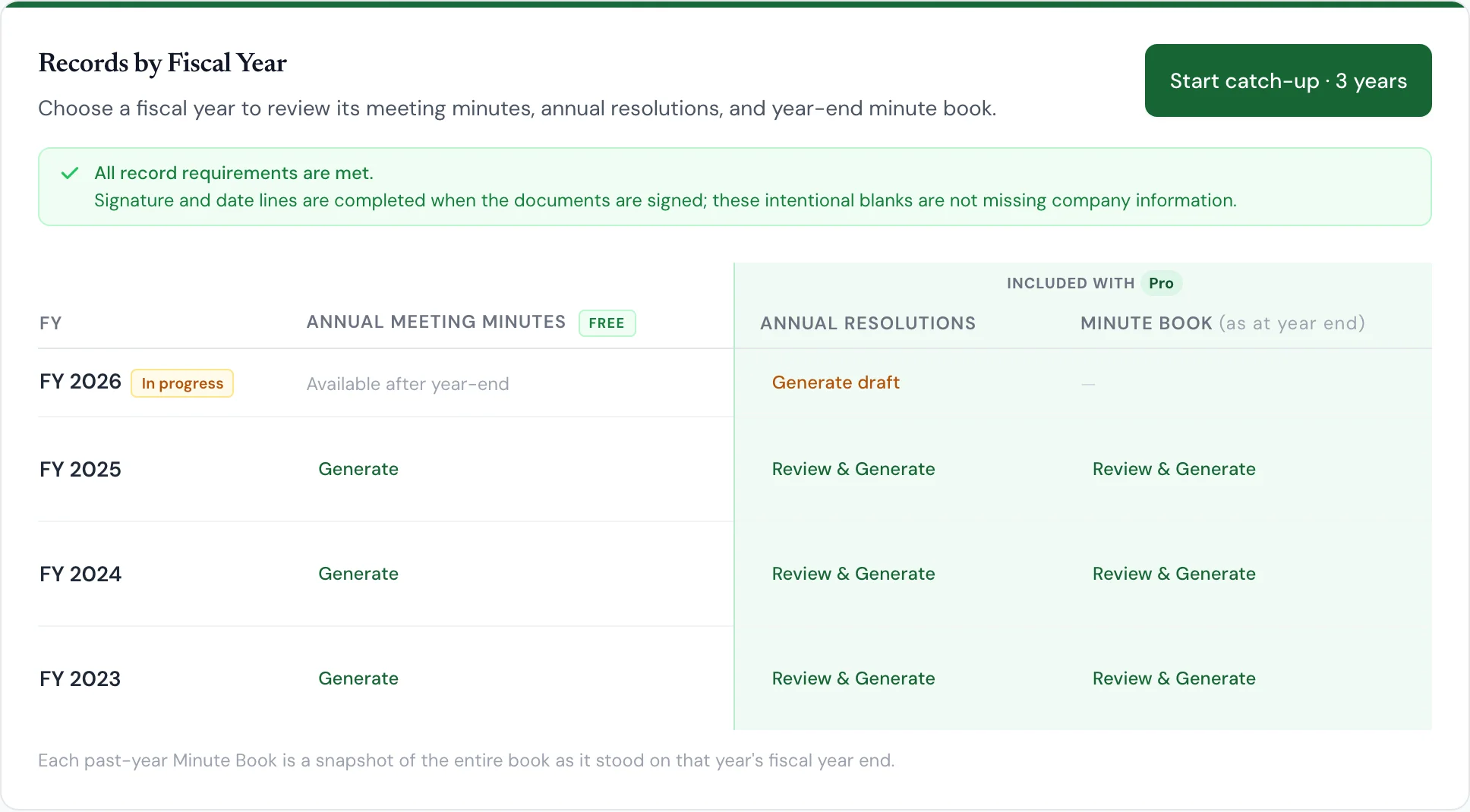
2. Tell MinuteKeep how the year was handled
For each year, choose what actually happened: Written resolutions were used, or An annual meeting was held. MinuteKeep prepares one matching record for the year, not both.
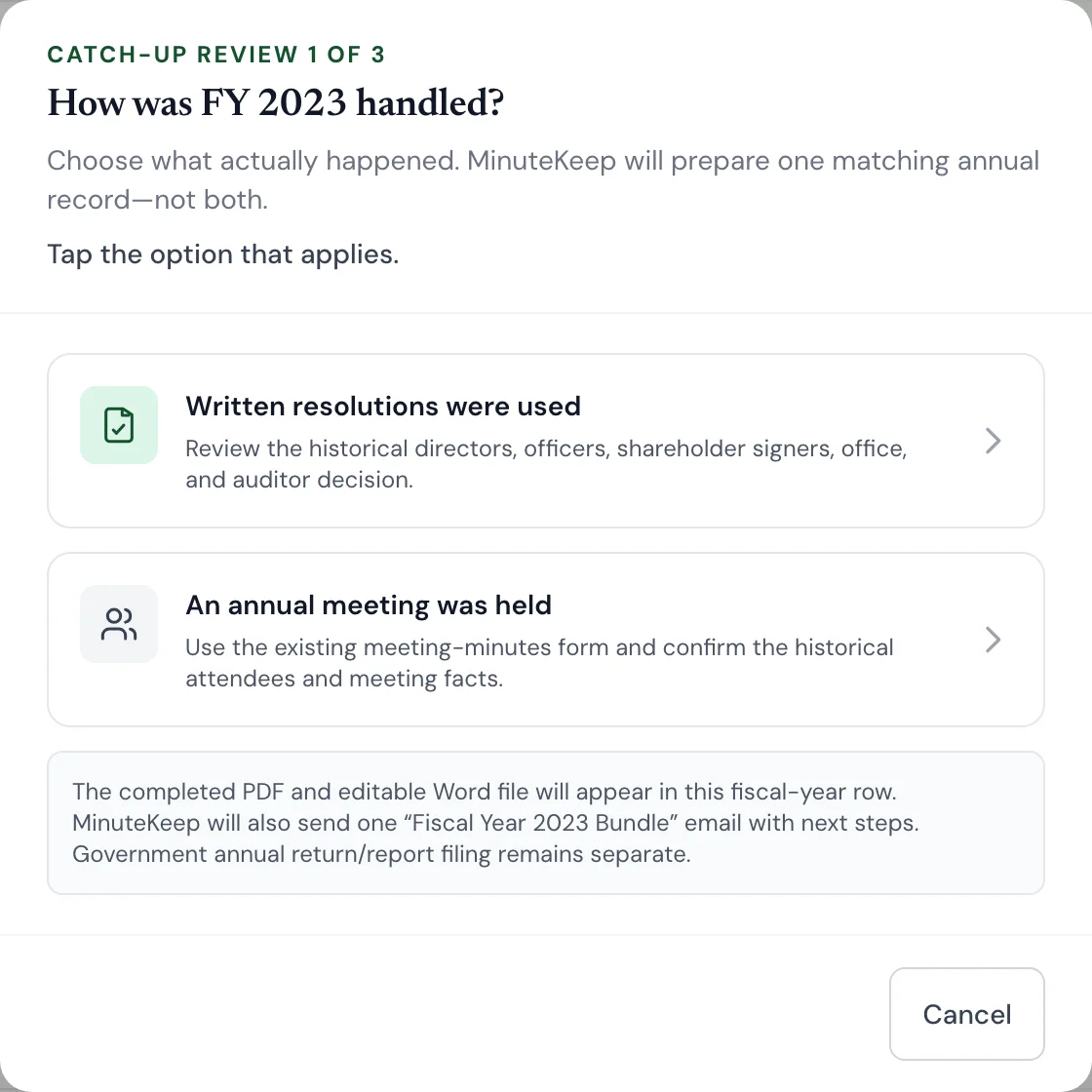
3a. Written resolutions: review the facts for that year
MinuteKeep fills in the directors, officers and shareholders from your People records as they stood at that year's fiscal year end, so someone who joined later won't appear on an earlier year. If anything is wrong for that year, correct it here with + Add, the name fields or ×. These quick edits change only this year's documents, not your current People records.
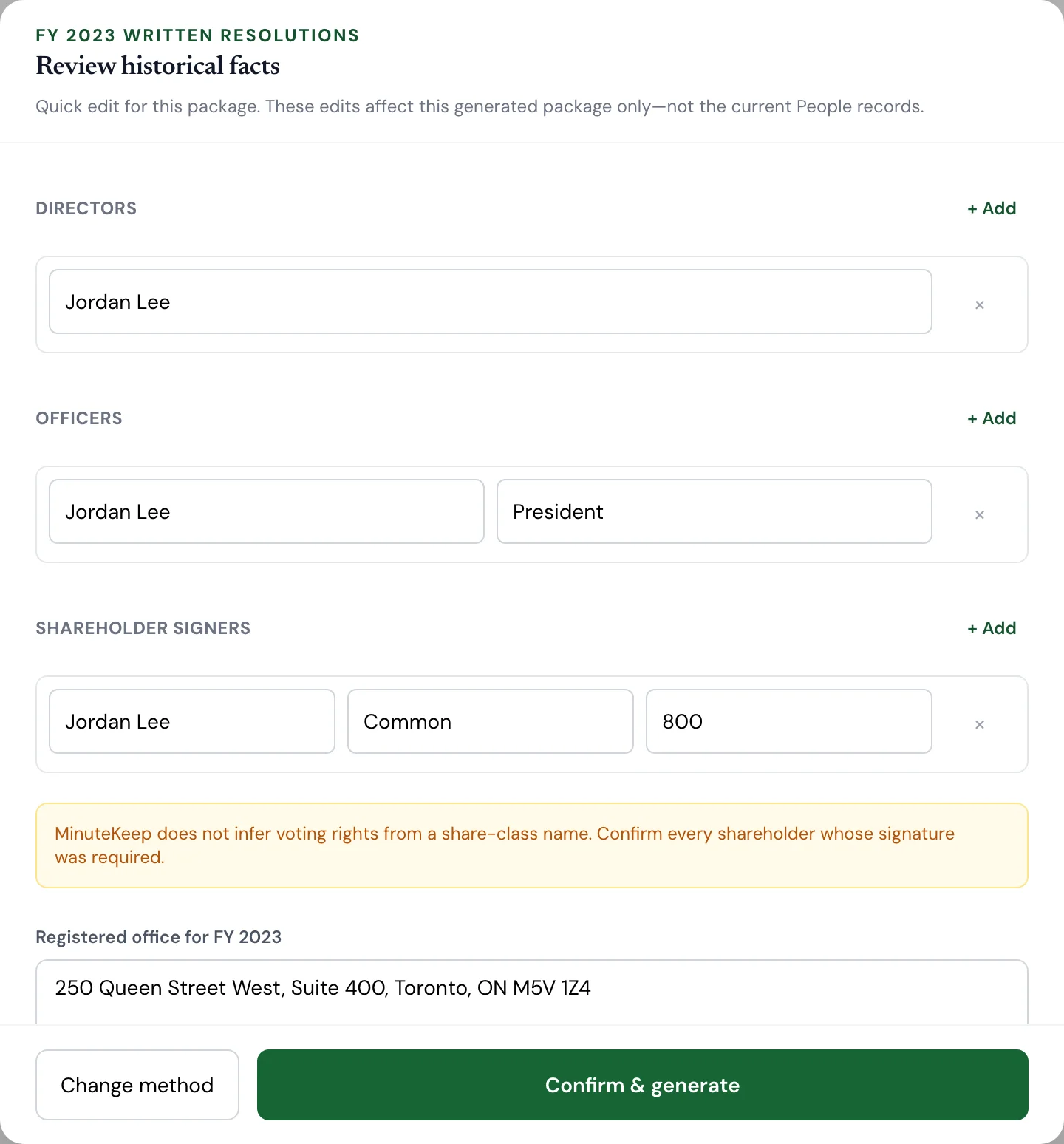
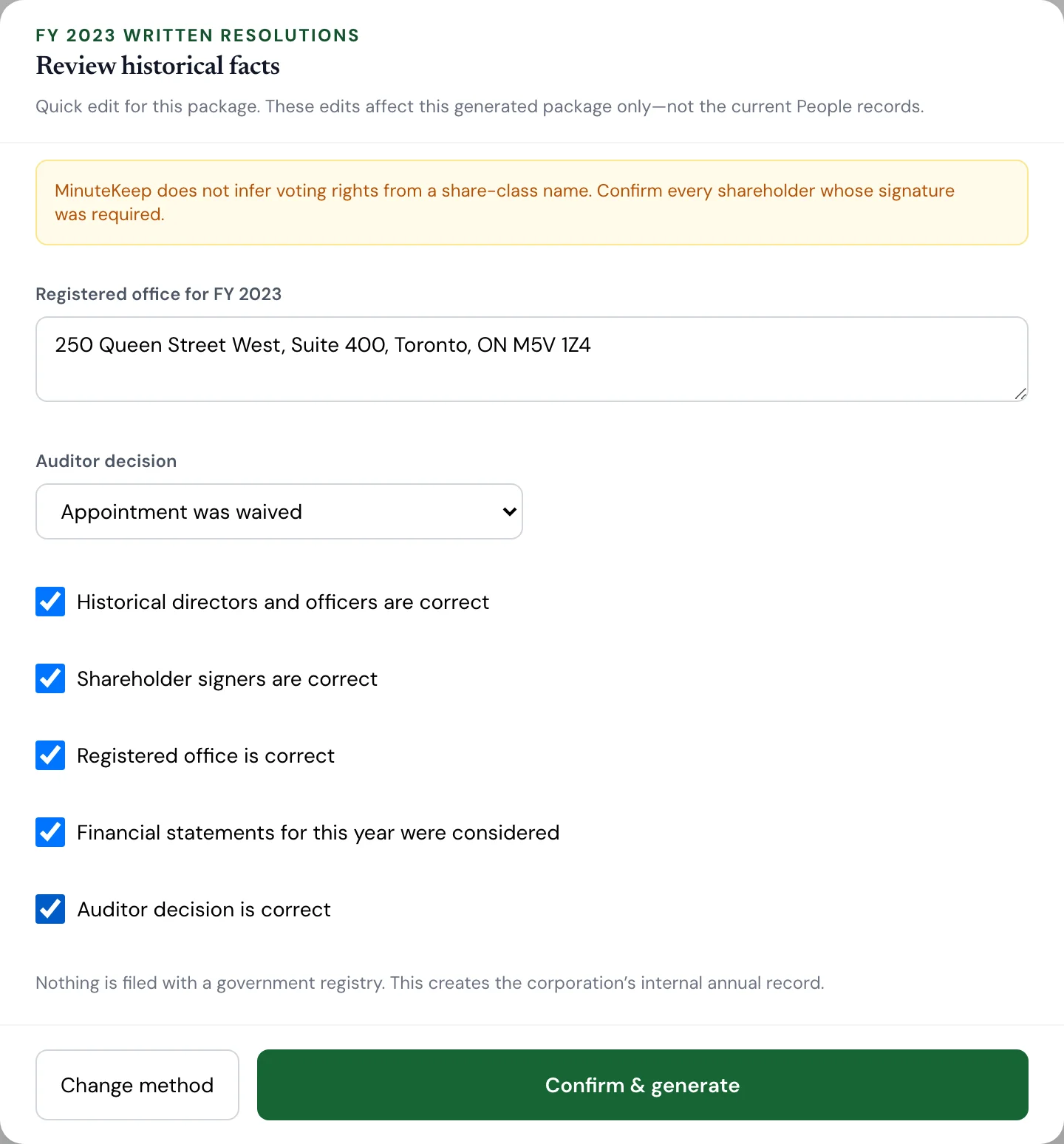
Check the registered office for that year, choose the auditor decision, and tick each confirmation. MinuteKeep doesn't infer voting rights from share-class names, so make sure every shareholder whose signature was required is listed. Then click Confirm & generate.
3b. Annual meeting: enter what happened at the meeting
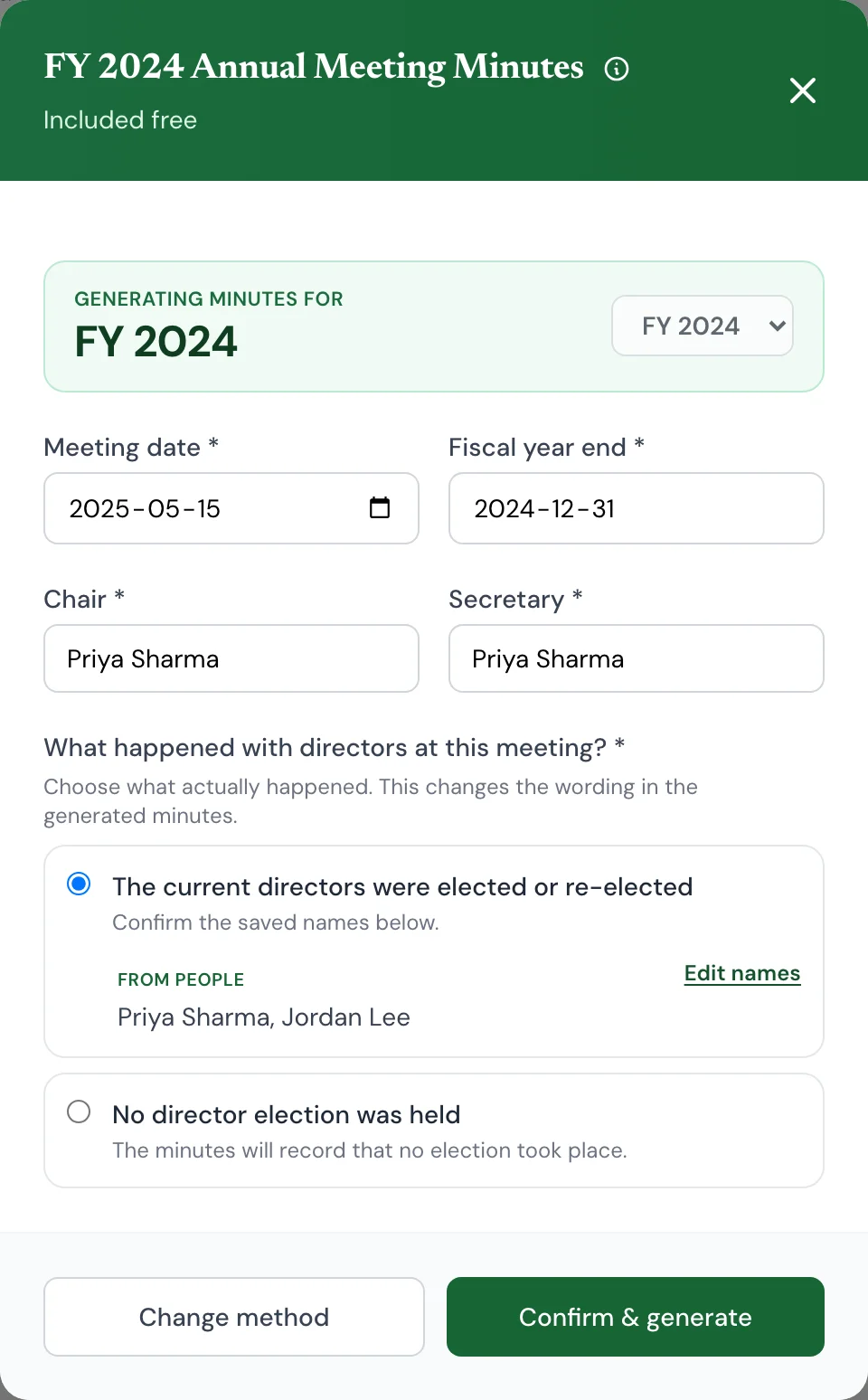
If a meeting was held, MinuteKeep opens the annual meeting minutes form for that year. Enter the meeting date, chair and secretary, and say whether directors were elected.
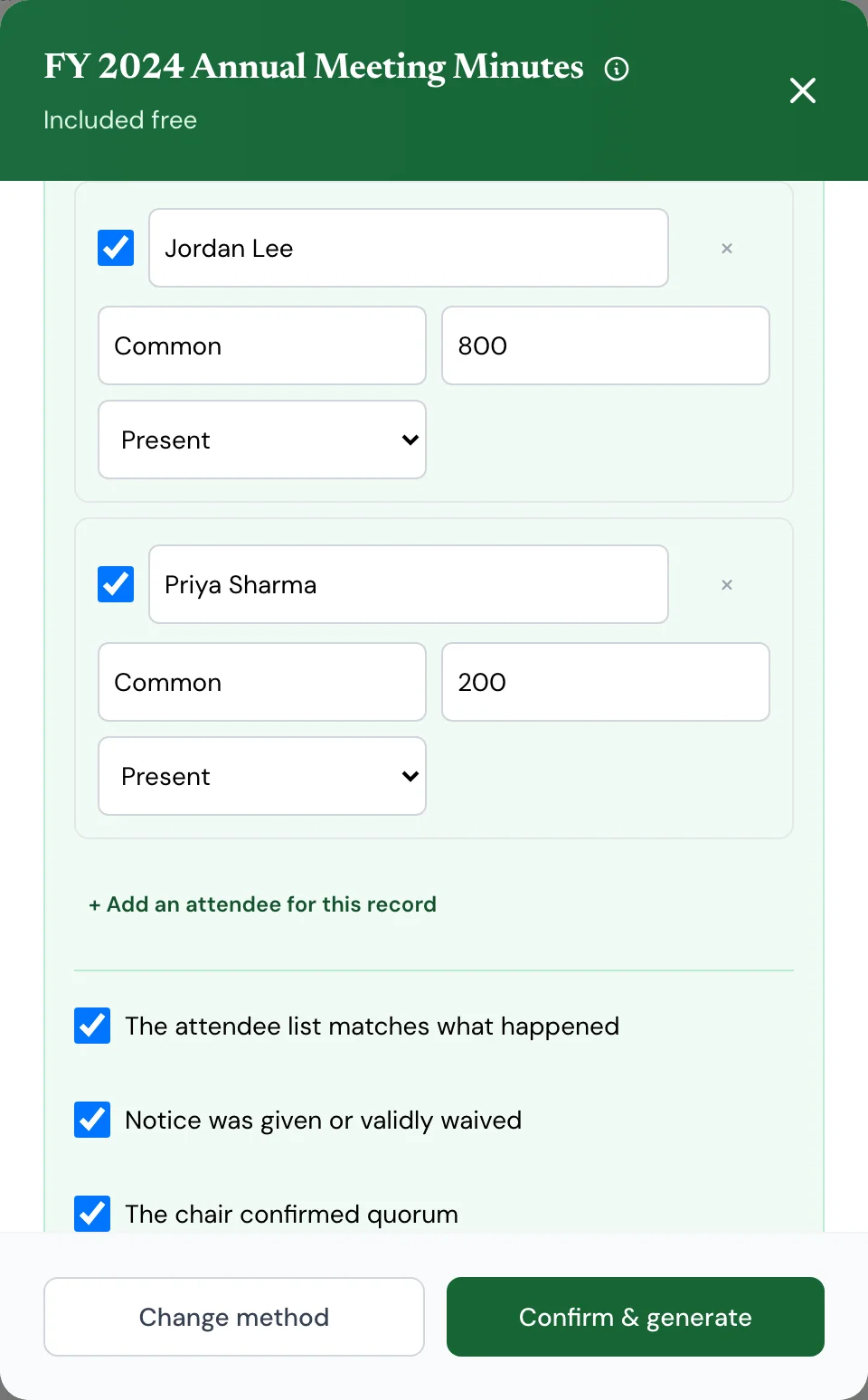
Under Historical meeting facts, select the shareholders who were present or represented by proxy, confirm notice, quorum and the financial statements, and choose the auditor decision. Then click Confirm & generate. Annual meeting minutes are included free.
4. Repeat for each year, then sign and file
After each year is generated, the next missing year opens automatically. Each completed year gets PDF and Word buttons in its row, and MinuteKeep emails a Fiscal Year Bundle with next steps for reviewing, signing and keeping the records. If an email doesn't arrive, click Resend in that year's row. When every year is done, the button changes to Annual records up to date.
Have the directors or shareholders sign each record, then keep the signed copies in your minute book. You can upload them under Files & uploads.
Good to know: this creates the corporation's internal annual records. MinuteKeep does not sign documents for you, and it does not file an annual return or corporate report with a government registry such as Corporations Canada or a provincial registry. That filing is separate. MinuteKeep doesn't provide legal advice or certify compliance.
How do I upgrade to Professional?
From your dashboard, click on the company you want to upgrade, then click Upgrade to Pro on the company page. You'll be taken to a checkout page.
Free includes corporation and People records, the first organizational resolution, and annual meeting minutes. Professional is $99 CAD/yr per corporation and adds: 2 GB for up to 100 uploaded PDFs, compiled minute book generation and downloads (PDF + DOCX), historical minute book views, annual resolutions, unlimited editing, and a compliance badge.
How do I store and organize my existing PDFs?
Open a corporation, choose Files & uploads in the left-hand menu, then Upload PDF to add existing records such as articles, bylaws or signed resolutions. File a standalone PDF in a binder section, or link a signed PDF to the specific generated record it belongs to. It will appear there in the current Interactive Minute Book without replacing the generated document. PDFs can also be labelled, categorized, marked important, reordered, downloaded in their original form, or deleted.
The account-wide Files page remains the generated-document archive across companies. Use a company’s Files & uploads area to upload a PDF.
Click or tap a file’s PDF icon to preview it without leaving Files. Previewing is not an AI review. If your browser cannot display the PDF, use Download original in the preview. Click the outline star to mark a file important, or the filled star to unmark it. The location label shows Not filed yet or its minute-book section; specific types and archived status appear as labelled badges. Generic type and active status stay in Edit details in the three-dot menu.
If a refresh fails, the prior files remain visible with Refresh files above them. Stars stay disabled until that read succeeds so a second click cannot act on an outdated importance mark. Refreshing does not repeat an upload or save.
After a confirmed location change, a small checkmark and Nicely filed. appear beside the saved location. This confirms filing, not the document’s contents or legal validity. If you prefer reduced motion, the confirmation appears without animation.
Free includes 250 MB per corporation, up to 25 PDFs, with a 50 MB limit per PDF. A 1 GB account-wide guard applies across Free corporations. Pro includes 2 GB and up to 100 PDFs per corporation, with the same 50 MB per-file limit.
The standard vault workflow stores and displays PDFs without interpreting their contents. The initial AI-organization pilot is restricted to one designated internal test owner and explicitly approved corporations; it is not available to other customers yet. In that pilot, the owner may see Organize with AI for an active uploaded record. If the owner then chooses Find its place, MinuteKeep AI processes that selected PDF to suggest one existing minute-book section. AI review has a separate limit of 10 MiB and 50 pages per PDF; larger or longer PDFs can still be placed manually. The feature does not check completeness, signatures, or legal validity, and it does not provide legal advice.
The suggested section and evidence output are temporary, and nothing moves unless the owner reviews the result and chooses File here. The two suggestion messages are MinuteKeep AI couldn’t find one clear match. Choose a section. and MinuteKeep AI couldn’t suggest a section right now. Choose a section. After a confirmation attempt, MinuteKeep refreshes Files. If the exact confirmation was acknowledged and the refreshed row is still unfiled, it says The file wasn’t moved. Choose a section. If the response was lost or unexpected, or its current placement cannot be confirmed, it says We couldn’t confirm the move. Refresh Files before trying again. The PDF remains available; follow the displayed refresh or manual-placement direction.
This AI feature is optional for each PDF. Choosing Not now sends nothing, and manual organization remains available on Free and Pro. An eligible account owner can use Files & uploads > AI organization settings > Turn off AI organization to withdraw the saved permission used for future PDF reviews for that company. Turning it off does not change any file or manual placement. If the owner later chooses Organize with AI, MinuteKeep asks them to confirm again before the selected PDF is reviewed.
The small gear beside Upload PDF opens AI organization settings and shows the saved On or Off state. To turn it back on when available, choose Turn on…, select one PDF, then Continue. Review the confirmation and choose Find its place. Opening settings or cancelling the confirmation does not send the PDF or turn permission on.
Turning off AI organization does not change the ordinary retention rules or provider handling that already occurred. See the AI Disclosure, Privacy Policy, and Sub-processors for data-handling details.
I paid but my account still shows Free — what do I do?
Return to your corporation in MinuteKeep after paying. We check your checkout automatically and activate Pro once payment is confirmed. You do not need to confirm payment yourself.
If you have a Stripe receipt and your corporation still shows Free after refreshing or using Check again, email support@minutekeep.ca with your receipt so we can investigate. If you left checkout without paying, your plan stays unchanged.
How do I download my documents?
Your documents are emailed to you automatically after generation. Check your inbox (and spam folder).
You can also re-download them anytime from the Files tab on your dashboard, or from the company's detail page. Documents are stored permanently — you won't lose access.
I can't sign in to my account
Use the Forgot password? link on the sign-in page. We'll email you a reset link.
Check your spam folder if you don't see it within a minute. If you're still locked out, email us at support@minutekeep.ca and we'll help you regain access.
How does the affiliate program work?
Sign up at /affiliates. You get a unique link immediately — no call, no dashboard.
If someone uses your link and pays $99 for Pro, you earn $20 CAD on that first payment. One time. Not on Free signups, not on refunds, and not on year two. We pay by e-transfer from a monthly report.
How do I cancel my subscription?
Go to your dashboard, click the user menu (top right), then select Billing. From there you can manage or cancel your subscription.
If you cancel, you'll keep Pro access until the end of your billing period. Your company data and documents remain accessible after cancellation.
You can also email us at support@minutekeep.ca and we'll handle it for you.
I didn't receive my document email
First, check your spam or junk folder — transactional emails sometimes land there.
If it's not there, re-download from your Files tab in the dashboard. Your documents are always available there regardless of email delivery.
Still can't find it? Email us at support@minutekeep.ca with your company name and we'll resend it.
Still have a question?
Email us at support@minutekeep.ca